Step Guide
Step Guide: Understanding the Model Repository
Every Skyway Builder project begins in the model repository. This step explains how projects, packages and types are stored, and how the editor keeps the model and the generated code in step.
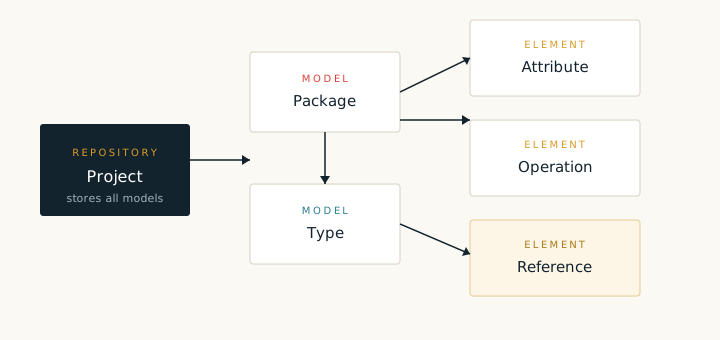
Skyway Builder treats an application as a model first and a codebase second. The model repository is the single place where that application model lives. A repository can hold more than one project, and each project owns a set of packages. A package contains types such as entities, services, controllers and flows. Types in turn expose attributes, operations and references.
The editor is a thin view over the repository. When you add a type or rename an attribute, the change is written to the model, not directly to a Java file. Generation is a separate step that reads the model and produces source, configuration and views. This separation is what makes it practical to regenerate a project many times without losing earlier design work.
What a project contains
- Model packages. Logical groups for related types, usually aligned with the layers of the application.
- Types. Entities, services, controllers and flow definitions, each with a stereotype that tells the generator what to produce.
- Elements. Attributes, operations and references that describe the detail of a type.
- Generation settings. The target project layout, package names and the recipes that should run.
Opening and organising a project
Create a project from the New Project command, choose a name and a target package, then add packages for the data, service and web layers. Keep package names short and stable. The generator derives Java package names from them, so a late rename touches many files. It is easier to settle the package layout before the first generation run.
com.example.data, com.example.service and com.example.web. The separation makes generated imports predictable and keeps review work small.When the model is ready, save the project. The repository writes a compact model file next to the project metadata. Commit that model file with the generated code so that another developer can open the same design and regenerate the project on a different machine.
The next step in this guide walks through the generation run and shows how to start the resulting Spring application in a local server.