Recipes
Recipe: Validation in a Spring Web Flow
Validation in a flow belongs to the transition, not to the view. This recipe shows how to attach a validator, route errors back to the form and keep the flow state clean.
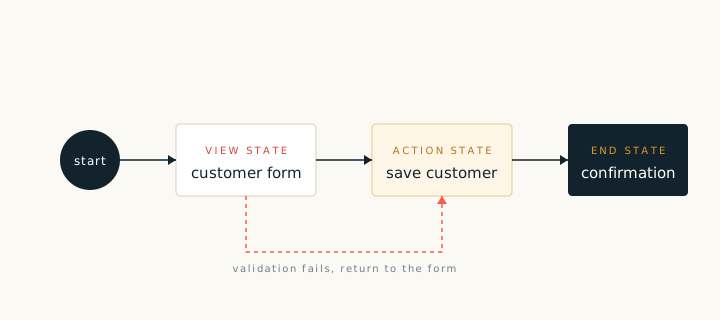
Spring Web Flow describes a user journey as a set of states and transitions. Validation is a guard on a transition. When the guard fails, the flow stays in the current view and exposes the error messages. This is different from a controller that renders a form again, and it keeps the whole journey in one definition.
Attaching a validator
Add a validation element to the view state or to the transition that leaves it. The model records the validator type and the fields it checks. The recipe writes the validator class and the flow definition entry that references it.
- Validate the form object, not the raw request parameters.
- Keep field checks in the validator and cross field rules in a service method.
- Return a structured result so that the view can place each message next to its field.
Routing errors
A validation transition has two outcomes. On success the flow moves to the next state. On failure it stays on the view and adds the error messages to the flow scope. Name the failure transition explicitly, for example invalid, so that the flow diagram is readable.
public void validate(Customer customer, MessageContext context) {
    if (customer.getEmail() == null || customer.getEmail().isEmpty()) {
        context.addMessage("customer.email.required");
    }
    if (customer.getName() == null || customer.getName().trim().isEmpty()) {
        context.addMessage("customer.name.required");
    }
}When a flow grows past a handful of states, split it into subflows. A subflow can be validated on its own and reused by more than one journey, which keeps each definition small.